Introduction
In order to use this device correctly, please carefully read “USING THE UNIT SAFELY” and “IMPORTANT NOTES” (the Leaflet “USING THE UNIT SAFELY) before use. After reading, keep these instructions at hand for immediate reference.
- The TR-08 can operate on batteries or on USB bus power. If you are using batteries, insert four AA batteries, making sure that the batteries are oriented correctly.
- If you handle batteries improperly, you risk explosion and fluid leakage. Make sure that you carefully observe all of the items related to batteries that are listed in “USING THE UNIT SAFELY” and “IMPORTANT NOTES” (leaflet “USING THE UNIT SAFELY”).
- When turning the unit over, be careful so as to protect the buttons and knobs from damage. Also, handle the unit carefully; do not drop it.
- When the batteries run low, the indication “Bt. Lo” appears in the display. Replace the battery as soon as possible.
Using the TR-08 in conjunction with the DK-01 Boutique Dock (accessory)
For installation/removal/angle adjustment, refer to the DK-01’s Owner’s Manual.
Playing the TR-08 via MIDI or USB
You can also play the TR-08 via MIDI or USB. For details, refer to “Connecting Your Equipment.”
Connecting Your Equipment
- To prevent malfunction and equipment failure, always turn down the volume, and turn off all the units before making any connections.

Micro USB (USBSYMBOL) port
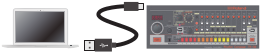
Use a commercially available USB 2.0 cable (A-microB) to connect this port to your computer. It can be used to transfer USB MIDI and USB audio data. You must install the USB driver when connecting the TR-08 to your computer. Download the USB driver from the Roland website. For details, refer to Readme.htm which is included in the download. => https://www.roland.com/support/
- Do not use a micro USB cable that is designed only for charging a device. Charge-only cables cannot transmit data.
[VOLUME] knob
Adjusts the volume.
PHONES jack
Connect headphones (sold separately) here.
OUTPUT jack
Connect this jack to your amp or monitor speakers.
MIX IN jack
This is the audio input jack. Sound from the connected device is output from the OUTPUT jack and PHONES jack.
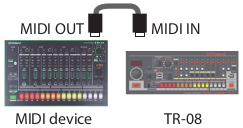
MIDI connectors
If you connect the TR-08 to another MIDI device using commercially available MIDI cables, the TR-08 can play in synchronization with the MIDI device.
Turning the TR-08 On
[POWER] switch
This turns the power on/off.
- After you’ve made connections correctly, be sure to turn on the power in the order of the TR-08 first, and then the connected system. Powering-on in the incorrect order may cause malfunctions or damage. When turning the power off, power-off the connected system first, and then the TR-08.
- Before turning the unit on/off, always be sure to turn the volume down. Even with the volume turned down, you might hear some sound when switching the unit on/off. However, this is normal and does not indicate a malfunction.
